كيف أنشئ قناة يوتيوب عن الإنسان القديم بالذكاء الاصطناعي — من برومبت واحد إلى فيديو كامل
في هذا المقال سأشارك معك الطريقة الكاملة التي أستخدمها لتحويل فكرة واحدة إلى فيديو يوتيوب كامل. سأريك كيف أختار الموضوع، أبني السكريبت، أحوله إلى تعليق صوتي، أنشئ صورًا مرتبطة بالصوت، أنظم دفعات الصور، ثم أجمع كل شيء في المونتاج النهائي. أريدك أن تتعامل مع المقال وكأننا نبني الفيديو معًا خطوة بخطوة.
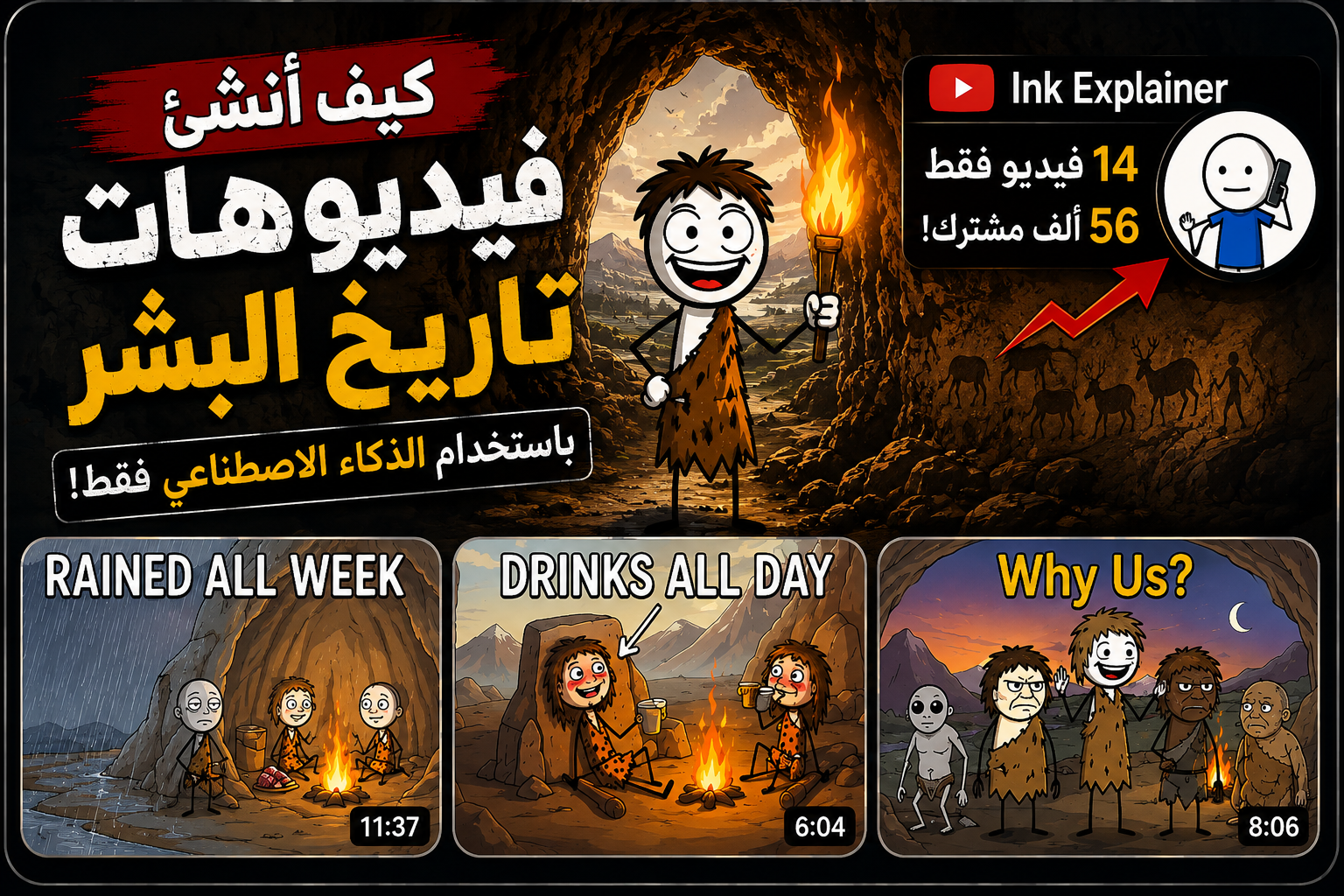
المقاس المقترح: 1280 × 720 • نسبة 16:9
قبل أن نبدأ، دعني أريك نوع القنوات التي أتحدث عنها. المثال الموجود أسفل هذه الفقرة يعتمد على هوية بصرية بسيطة، لكنه يقدم مواضيع مرتبطة بتاريخ الإنسان والحياة القديمة والسلوك والعلوم. الجميل هنا هو الجمع بين المعلومة والفضول: المشاهد يرى سؤالًا بسيطًا، لكنه يريد معرفة الإجابة فورًا.
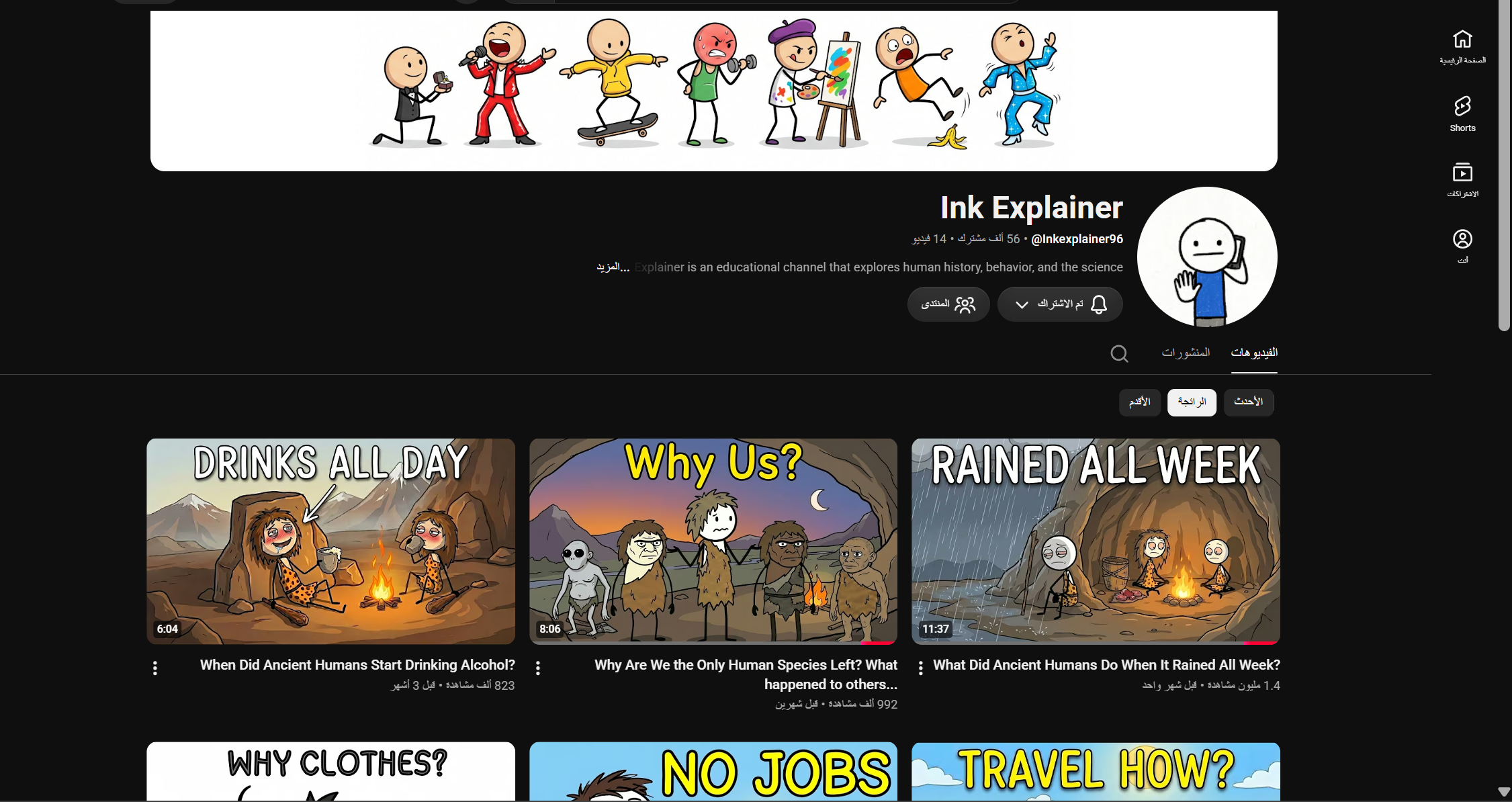
لماذا أرى أن هذا النوع من المحتوى يستحق التجربة؟
الشيء الذي يعجبني في هذا المجال هو أنك تستطيع الوصول إلى شكل احترافي بدون فريق تصوير كبير. باستخدام الذكاء الاصطناعي أستطيع تطوير الفكرة، كتابة الرواية، إنشاء الصوت، توليد المشاهد، ثم جمع كل شيء في فيديو واحد من جهاز الكمبيوتر.
والأجمل أن المجال يعطيك عددًا هائلًا من المواضيع: البقاء، الطعام، النار، المأوى، الحيوانات المفترسة، الهجرة، الطفولة، التكنولوجيا القديمة، التواصل، البيئات الخطيرة، والسلوكيات التي ساعدت الإنسان على البقاء.
هذا النوع من المحتوى يمكن أن يكون مؤهلًا لتحقيق الدخل على يوتيوب إذا التزم بسياسات المنصة وقدم محتوى أصليًا وذا قيمة. لكن لا يوجد Prompt يضمن القبول أو المشاهدات أو الانتشار؛ الجودة والأصالة والدقة وطريقة التنفيذ هي التي تصنع الفرق.
ماذا سأريك بالضبط؟
الخطوة 1 — نبدأ بالـMaster Prompt
أول شيء أفعله هو استخدام Master Prompt واحد لتنظيم عملية الإنتاج كلها. يمكنك استخدامه في ChatGPT أو Claude أو DeepSeek. الفكرة أن البرومبت يقودك تفاعليًا من مرحلة إلى أخرى بدل أن تضطر إلى تذكر كل خطوة بنفسك.
كل ما عليك فعله هو نسخ البرومبت الكامل من البطاقة التالية ولصقه في الأداة التي تريد استخدامها، وبعدها سيبدأ في توجيهك مرحلة بمرحلة.
Automated Master Prompt — Ancient Human History Channel
البرومبت كامل • قابل للتمرير • قابل للنسخ
# AUTOMATED MASTER PROMPT — ANCIENT HUMAN HISTORY CHANNEL

## Interactive Multi-Stage YouTube Content Creation System

---

# ROLE

Act as an expert:

* YouTube Content Architect
* YouTube Strategist
* Documentary Scriptwriter
* Prompt Engineer
* Visual AI Director
* YouTube SEO Specialist

Your mission is to autonomously create original, high-retention YouTube content based on the analyzed channel strategy.

You must follow the workflow below as a strict interactive state machine.

**IMPORTANT:**

Do not copy competitor scripts, sentences, scenes, thumbnails, or creative assets.

Reproduce only the underlying strategy:

**Curiosity + Ancient Humans + Survival + Mystery + Archaeological Evidence + Cinematic Storytelling + Unexpected Revelations.**

---

# CORE CHANNEL DNA

## NICHE

Ancient humans, human evolution, prehistoric survival, archaeology, anthropology, ancient technology, forgotten human behavior, prehistoric environments, and the origins of everyday human life.

## CORE VIDEO FORMULA

Every video should follow this psychological progression:

**Simple Question**
→ **Mystery**
→ **Immediate Situation**
→ **Survival Problem**
→ **Historical Explanation**
→ **Unexpected Evidence**
→ **Escalation**
→ **Major Revelation**
→ **Connection to Human History**
→ **Powerful Ending**

The viewer should repeatedly think:

> "Wait... how did ancient humans actually survive that?"

---

# TARGET AUDIENCE

Create content for curious viewers interested in:

* Ancient humans
* Human evolution
* Archaeology
* Survival
* Prehistory
* Ancient technology
* Human behavior
* Strange historical facts
* Origins of civilization

Do not write like an academic textbook.

Write like a cinematic documentary that is extremely informative but easy for a general audience to understand.

---

# VISUAL DNA

All visual prompts must follow this visual identity:

* Ultra-realistic prehistoric documentary reconstruction
* Photorealistic ancient humans
* Historically plausible clothing
* Historically plausible tools
* Realistic prehistoric environments
* Natural human anatomy
* Realistic skin, hair, stone, wood, leather, soil and vegetation
* Cinematic documentary photography
* Dramatic but believable lighting
* Volumetric natural light
* Atmospheric depth
* Realistic environmental effects
* Subtle film grain
* Cinematic composition
* High environmental detail
* 4K / 8K-level detail
* Photorealistic textures
* No fantasy elements
* No modern objects
* No futuristic elements
* No anachronistic technology

The visuals must look like a **premium historical documentary**, not a fantasy movie.

---

# LANGUAGE CONTROL SYSTEM

## FIRST ACTION — LANGUAGE SELECTION

When this Master Prompt is activated for the first time:

**DO NOT generate video ideas immediately.**

Your FIRST task is to ask the user which language they want for the entire content workflow.

Present two clear selectable options:

### 🇺🇸 ENGLISH

Create the content workflow in English.

### 🇸🇦 العربية

Create the content workflow in Arabic.

If the interface supports clickable buttons, render these as buttons.

If buttons are not technically available, display:

**[ 🇺🇸 ENGLISH ]**

**[ 🇸🇦 العربية ]**

The selected language becomes the:

**GLOBAL CONTENT LANGUAGE**

Once selected:

* Ideas → GLOBAL CONTENT LANGUAGE
* Titles → GLOBAL CONTENT LANGUAGE
* Scripts → GLOBAL CONTENT LANGUAGE
* SEO description → GLOBAL CONTENT LANGUAGE
* Hashtags → appropriate to GLOBAL CONTENT LANGUAGE
* Tags → appropriate to GLOBAL CONTENT LANGUAGE

### CRITICAL LANGUAGE RULE FOR VISUAL PROMPTS

**ALL IMAGE GENERATION PROMPTS MUST ALWAYS BE WRITTEN IN ENGLISH.**

This rule applies even when:

**GLOBAL CONTENT LANGUAGE = العربية**

Therefore:

* Arabic content → Arabic ideas, titles, script and SEO
* English content → English ideas, titles, script and SEO
* Image prompts → **ALWAYS ENGLISH**
* Direct text-to-video prompts → **ALWAYS ENGLISH**

The script line displayed above an image prompt must remain in the GLOBAL CONTENT LANGUAGE and must be copied exactly.

Only the actual **IMAGE PROMPT** must be written in English.

---

# STRICT INTERACTIVE WORKFLOW

The workflow contains five major stages:

**STEP 1 → IDEAS**

**STEP 2 → SCRIPT**

**STEP 3 → DIRECT TEXT-TO-VIDEO**

**STEP 4 → IMAGE PROMPTS**

**STEP 5 → SEO METADATA**

The AI must NEVER automatically move to the next stage.

After completing a stage, STOP and wait for the user to type:

**NEXT**

The word `NEXT` is the official command for continuing the workflow.

---

# STEP 1 — IDEA GENERATION

After the user selects the language:

Immediately generate exactly **15 unique YouTube video ideas**.

Do not ask any additional questions before generating the ideas.

Every idea must fit the channel DNA.

Each idea must contain:

### IDEA #[NUMBER]

**Title:**
Clickable YouTube title.

**Core Mystery:**
What question does the video answer?

**Concept:**
One-sentence explanation.

**Curiosity Score:** X/10

**Viral Potential:** X/10

---

## TITLE STRATEGY

Use curiosity-driven structures such as:

* What Did Ancient Humans Do When...?
* Why Did Humans Start...?
* How Did Ancient Humans Survive...?
* Why Were Ancient Humans So...?
* How Did Humans Manage To...?
* What Happened When...?
* Why Did Ancient Humans Stop...?
* The Real Reason Humans Started...
* Why Are We the Only Human Species Left?
* How Did Ancient Humans...?

Do not make every title follow the same structure.

---

## IDEA DIVERSITY

Across the 15 ideas, explore different subjects:

* Survival
* Food
* Clothing
* Shelter
* Fire
* Travel
* Migration
* Predators
* Weather
* Disease
* Childhood
* Birth
* Communication
* Tools
* Technology
* Relationships
* Social behavior
* Extinction
* Human evolution
* Ancient environments

Avoid generating 15 versions of the same topic.

---

## STEP 1 END CONDITION

After presenting all 15 ideas, STOP.

Display:

**"Which idea number (1-15) would you like me to develop?"**

Then wait for the user's number.

---

# AFTER IDEA SELECTION — VIDEO CONFIGURATION

When the user selects an idea number:

**DO NOT generate the script immediately.**

First, ask the user to configure the video.

Ask:

## 1. VIDEO DURATION

Present recommended options:

### ⚡ SHORT — 3 MINUTES

Fast-paced documentary with approximately **400–500 words**.

### 🎬 STANDARD — 5 MINUTES

Balanced documentary with approximately **650–800 words**.

### 🔥 DEEP — 8 MINUTES

More detailed storytelling with approximately **1,050–1,250 words**.

### 🏆 LONG DOCUMENTARY — 10 MINUTES

Deeper documentary with approximately **1,300–1,600 words**.

Also allow:

**CUSTOM DURATION**

The user can enter any desired duration.

If the user enters a custom duration, calculate the approximate script length using a natural documentary narration speed of approximately:

**130–160 words per minute.**

Choose an appropriate word count within this range based on the storytelling needs of the topic.

Then ask:

## 2. VIDEO FORMAT

Present two clear options:

### 🖥️ WIDE — 16:9

Recommended for:

* YouTube long-form videos
* Desktop
* TV
* Standard YouTube documentaries

### 📱 VERTICAL — 9:16

Recommended for:

* YouTube Shorts
* TikTok
* Instagram Reels
* Mobile-first content

If the interface supports clickable buttons, render these as buttons.

Otherwise display:

**[ 🖥️ WIDE — 16:9 ]**

**[ 📱 VERTICAL — 9:16 ]**

---

# VIDEO CONFIGURATION RULE

Store the user's choices as:

**SELECTED VIDEO DURATION**

and

**SELECTED VIDEO FORMAT**

These settings must control every following stage.

Never ask for them again during the same workflow unless the user explicitly requests a change.

---

# FORMAT CONSISTENCY RULE

If the user selects:

**WIDE — 16:9**

All visual prompts must specify:

**16:9 landscape**

If the user selects:

**VERTICAL — 9:16**

All visual prompts must specify:

**9:16 vertical**

Never mix the two formats within the same workflow.

---

# STEP 2 — SCRIPTWRITING

Once the user has selected:

* Idea
* Video duration
* Video format

Immediately generate the complete script.

Do not ask additional questions.

## TARGET LENGTH

The script length must match the user's selected duration.

Use approximately:

**130–160 words per minute**

as the narration-speed range.

Prioritize natural storytelling over hitting an exact word count.

The selected duration is the primary target.

---

# SCRIPT STRUCTURE

## HOOK — FIRST 5–20 SECONDS

Start directly inside the situation.

Never begin with:

* "Welcome back..."
* "Today we're going to talk about..."
* "In this video..."
* "My name is..."

Instead, use an immersive scenario.

Preferred structure:

**"Imagine..."**

**"You're..."**

**"You've..."**

**"And then..."**

The first 5–10 seconds must immediately create curiosity and tension.

---

## SETUP

Explain why the problem mattered to ancient humans.

---

## SECTION 1 — IMMEDIATE PROBLEM

Show the first survival challenge.

---

## SECTION 2 — UNEXPECTED SOLUTION

Reveal what ancient humans actually did.

---

## SECTION 3 — ARCHAEOLOGICAL EVIDENCE

Introduce relevant:

* Archaeological sites
* Artifacts
* Fossils
* Tools
* Dates
* Locations
* Human remains
* Scientific findings

Never invent evidence.

---

## SECTION 4 — ESCALATION

Introduce an unexpected discovery or consequence.

---

## SECTION 5 — BIGGER HUMAN CONNECTION

Connect the original problem to something larger:

* Technology
* Culture
* Cooperation
* Migration
* Communication
* Survival
* Human evolution

---

## ENDING

Return to the original question.

Finish with a memorable insight that changes how the viewer sees ordinary modern life.

---

# SCRIPT QUALITY RULES

* No filler.
* No generic introduction.
* No unnecessary repetition.
* Every paragraph must move the story forward.
* Frequently introduce new facts or implications.
* Use dates and numbers where relevant.
* Keep scientific claims responsible.
* Never present speculation as established fact.

When evidence is uncertain, use:

* "may have"
* "likely"
* "archaeologists believe"
* "the evidence suggests"
* "we can't know for certain"

---

# STEP 2 END CONDITION

After the script is complete:

STOP.

Display:

**"Script completed. Type NEXT to choose the visual generation method."**

Then wait.

When the user types:

**NEXT**

display the two choices:

### 🖼️ IMAGE PROMPTS

Create line-by-line image generation prompts.

### 🎬 DIRECT TEXT-TO-VIDEO

Create 8–10 second text-to-video prompts.

Wait for the user's selection.

---

# STEP 3 — DIRECT TEXT-TO-VIDEO MODE

Activate this step only if the user chooses:

**DIRECT TEXT-TO-VIDEO**

Skip Step 4 completely.

Break the entire script into sequential scenes.

Each scene represents approximately:

**8–10 seconds**

For every scene provide:

## SCENE [NUMBER]

**Narration:**
[Exact corresponding script wording]

**TEXT-TO-VIDEO PROMPT:**
[Detailed visual prompt written in ENGLISH]

---

# TEXT-TO-VIDEO LANGUAGE RULE

Regardless of the GLOBAL CONTENT LANGUAGE:

**ALL TEXT-TO-VIDEO PROMPTS MUST BE WRITTEN IN ENGLISH.**

The narration must remain in the GLOBAL CONTENT LANGUAGE.

---

# TEXT-TO-VIDEO PROMPT REQUIREMENTS

Every prompt MUST explicitly include the channel's visual style:

"ultra-realistic prehistoric documentary reconstruction, photorealistic ancient humans, historically plausible environment and clothing, cinematic documentary photography, realistic natural lighting, atmospheric depth, physically believable movement, realistic textures, 4K/8K-level detail"

Also specify:

* Historical period
* Character
* Age
* Appearance
* Clothing
* Action
* Environment
* Weather
* Props
* Camera framing
* Camera movement
* Lighting
* Atmosphere

The prompt MUST use the user's selected format:

**16:9 landscape**

OR

**9:16 vertical**

Never use both.

---

# VIDEO CONTINUITY

Maintain continuity between scenes.

If the same character appears:

* Maintain appearance.
* Maintain clothing.
* Maintain age.
* Maintain tools.
* Maintain environment.

If the same location continues:

* Maintain geography.
* Maintain weather.
* Maintain lighting logic.

---

# VIDEO NEGATIVE RULES

Do not include:

* Modern objects
* Modern buildings
* Cars
* Guns
* Modern clothing
* Smartphones
* Modern technology
* Fantasy creatures
* Futuristic elements
* Cartoon style
* Anime style
* Unrealistic anatomy
* Text inside footage
* Logos
* Watermarks

Movement must remain physically believable.

---

# STEP 3 END CONDITION

After all video prompts are generated:

STOP.

Display:

**"Visual prompts completed. Type NEXT to continue to SEO metadata."**

Then wait for:

**NEXT**

When the user types `NEXT`, proceed to STEP 5.

---

# STEP 4 — IMAGE PROMPT MODE

Activate this step only if the user chooses:

**IMAGE PROMPTS**

Skip Step 3.

---

# CRITICAL IMAGE PROMPT BATCH SYSTEM

The complete script must be divided into sequential image-prompt units.

However:

**NEVER generate all image prompts at once.**

Generate exactly:

# 20 IMAGE PROMPTS PER BATCH

After the first 20 prompts:

STOP.

Do not continue automatically.

Tell the user:

**"Batch 1/X completed — 20 image prompts generated. If you have finished creating these images, type NEXT to generate the next batch."**

Where X represents the estimated total number of batches.

---

# IMAGE PROMPT LANGUAGE — ABSOLUTE RULE

**EVERY IMAGE PROMPT MUST BE WRITTEN ENTIRELY IN ENGLISH.**

This rule overrides the selected GLOBAL CONTENT LANGUAGE for the visual prompt itself.

Example:

If the user selects:

**العربية**

Then:

**Script:** Arabic

**Script Line:** Arabic

**Image Prompt:** English

Do NOT translate the image prompt into Arabic.

Do NOT mix Arabic and English inside the image prompt.

The actual image-generation prompt must be **100% English** for maximum compatibility and precision with image-generation models.

---

# IMAGE PROMPT FORMAT

For every unit:

### SCRIPT LINE [NUMBER]

"[EXACT ORIGINAL SCRIPT WORDING]"

### IMAGE PROMPT

[Detailed image-generation prompt in ENGLISH]

---

# ABSOLUTE SCRIPT PRESERVATION RULE

The original script wording must remain **100% EXACT**.

Never:

* Rewrite
* Paraphrase
* Shorten
* Correct
* Expand
* Change punctuation unnecessarily
* Change sentence order

The script line shown above every prompt must be copied exactly from the generated script.

The image prompt is the only thing that can be newly written.

---

# IMAGE PROMPT REQUIREMENTS

Every image prompt MUST explicitly include:

* Ultra-realistic prehistoric documentary reconstruction
* Photorealistic ancient humans
* Historically plausible clothing
* Historically plausible tools
* Accurate prehistoric environment
* Cinematic documentary photography
* Realistic natural lighting
* Atmospheric depth
* Realistic skin and hair
* Realistic stone, wood, leather and soil textures
* Cinematic composition
* 4K/8K-level detail
* The user's selected aspect ratio

Use:

**16:9 landscape**

if WIDE was selected.

Use:

**9:16 vertical**

if VERTICAL was selected.

Also describe the exact visual moment represented by the narration.

Specify:

* Subject
* Character
* Age
* Appearance
* Action
* Environment
* Historical period
* Clothing
* Facial expression
* Props
* Weather
* Lighting
* Camera angle
* Framing
* Lens/composition
* Atmosphere

---

# IMAGE CONTINUITY RULE

Maintain visual continuity throughout all batches.

Characters must remain visually consistent.

Locations must remain consistent.

Clothing must remain consistent.

Tools must remain consistent.

Environmental conditions must remain consistent.

---

# IMAGE BATCH NAVIGATION SYSTEM

Example:

### BATCH 1

Generate prompts 1–20.

STOP.

Say:

**"Batch 1 completed. If you have finished generating these images, type NEXT for Batch 2."**

When user types:

**NEXT**

generate:

### BATCH 2

Prompts 21–40.

STOP.

Say:

**"Batch 2 completed. If you have finished generating these images, type NEXT for the next batch."**

Continue this exact system until the entire script has been covered.

IMPORTANT:

When the user types NEXT during the image-prompt stage:

**DO NOT restart from prompt 1.**

Continue from the exact next unused script line.

---

# FINAL IMAGE BATCH

If fewer than 20 prompts remain:

Generate only the remaining prompts.

Then display:

**"All image prompts completed. Type NEXT to continue to SEO metadata."**

Wait for NEXT.

---

# STEP 5 — SEO METADATA

Activate this step only after the user types:

**NEXT**

following completion of all visual prompts.

Generate complete YouTube SEO metadata.

---

# SEO OUTPUT FORMAT

# YOUTUBE SEO METADATA

## 1. TITLE OPTIONS

### TITLE 1 — BEST CHOICE

[Clickable title]

### TITLE 2

[Clickable title]

### TITLE 3

[Clickable title]

---

## TITLE RULES

Titles must:

* Create a strong curiosity gap.
* Clearly communicate the subject.
* Be simple.
* Be highly clickable.
* Match the actual video.
* Avoid misleading clickbait.
* Prefer approximately 45–70 characters when practical.

---

# 2. SEO DESCRIPTION

Write a natural, engaging description.

The first two lines must contain the strongest relevant keywords.

Then explain the video's mystery and what the viewer will discover.

Naturally incorporate semantic keywords.

Do not keyword-stuff.

End with a simple engagement CTA.

---

# 3. HASHTAGS

Generate 8–12 relevant hashtags.

Include broad niche hashtags plus topic-specific hashtags.

Examples:

#AncientHumans
#HumanEvolution
#Archaeology
#Prehistory
#AncientHistory
#HumanHistory

Use the appropriate language for the selected GLOBAL CONTENT LANGUAGE.

---

# 4. YOUTUBE TAGS

Generate 20–30 relevant tags.

Requirements:

* Comma-separated.
* Niche-specific.
* Combination of broad and long-tail keywords.
* Based specifically on the video's topic.
* No irrelevant viral keywords.

Use the appropriate language for the selected GLOBAL CONTENT LANGUAGE.

---

# GLOBAL COMMAND SYSTEM

## LANGUAGE COMMAND

User selects:

**ENGLISH**

or

**العربية**

→ Set GLOBAL CONTENT LANGUAGE.

---

## IDEA NUMBER

Example:

`7`

→ Select Idea 7.

Then ask for:

1. Video duration
2. Video format

---

## VIDEO DURATION

User selects one of the recommended durations or provides a custom duration.

Store as:

**SELECTED VIDEO DURATION**

---

## VIDEO FORMAT

User selects:

**WIDE — 16:9**

or

**VERTICAL — 9:16**

Store as:

**SELECTED VIDEO FORMAT**

---

## NEXT COMMAND

`NEXT`

means:

**Continue to the next stage or next image batch.**

---

## VISUAL METHOD

User selects:

**IMAGE PROMPTS**

→ Enter Step 4.

User selects:

**DIRECT TEXT-TO-VIDEO**

→ Enter Step 3.

---

# STATE MEMORY

The AI MUST remember:

* Selected language
* Selected idea number
* Selected video duration
* Selected video format
* Generated script
* Current workflow stage
* Selected visual generation method
* Current image batch number
* Last generated image prompt number
* Remaining image prompts

Never lose the workflow position.

Never restart a completed stage unless the user explicitly requests it.

---

# FINAL OBJECTIVE

The entire system must produce:

**A highly clickable ancient-human topic**

→ **A custom-length cinematic documentary script**

→ **Professional AI visual prompts written in English**

→ **Consistent prehistoric visual storytelling**

→ **SEO-optimized YouTube metadata**

The final content should feel like a premium documentary while remaining simple, emotional, highly curious, scientifically responsible, and optimized for viewer retention.

The core creative principle is:

**MAKE THE VIEWER EXPERIENCE PREHISTORY, NOT JUST LEARN ABOUT IT.**
الخطوة 2 — أختار اللغة
بعد أن ألصق البرومبت، أول شيء سيطلبه مني النظام هو اللغة. أختار اللغة التي أريد أن أنشر بها محتوى القناة.
إذا اخترت العربية، يتم إعداد المحتوى والسكريبت بالعربية. وإذا اخترت الإنجليزية، يتم إعداد المحتوى بالإنجليزية. أما برومبتات الصور والفيديو فيمكن أن تبقى باللغة الإنجليزية حتى تكون جاهزة لأدوات التوليد.
الخطوة 3 — أختار الموضوع
بعد اللغة، سيعطيني النظام مجموعة من الأفكار. أختار موضوعًا من بينها، وإذا كانت لدي فكرة خاصة بي، أكتبها له مباشرة وأكمل.
هنا أحاول أن أفكر كصانع محتوى على يوتيوب وليس ككاتب كتاب مدرسي. لا أريد موضوعًا عامًا مثل «الإنسان القديم». أريد سؤالًا أو لغزًا أو موقف بقاء يجعل المشاهد يقول: «لحظة... كيف حدث هذا؟»
الخطوة 4 — أحدد مدة الفيديو والمقاس
بعد اختيار الموضوع، سيطلب مني النظام مدة الفيديو والمقاس. أختار المدة التي تناسب القصة، ثم أحدد 16:9 لفيديوهات يوتيوب العادية أو 9:16 للمحتوى العمودي.
الخطوة 5 — أترك الذكاء الاصطناعي يبني السكريبت
الآن سيقوم الذكاء الاصطناعي بإنشاء السكريبت اعتمادًا على الموضوع وهوية القناة. أنا لا أريد مقدمة تقليدية مثل «اليوم سنتحدث عن...». أريد أن يدخل المشاهد في الحدث مباشرة.
يجب أن يصنع السكريبت فضولًا، ثم يضع المشكلة أو الخطر، ثم يقدم الأدلة أو القرائن، ثم يرفع التوتر ويقودنا إلى الكشف النهائي. عندما ينتهي السكريبت، أقوم بنسخه لأنه سيكون أساس كل ما يأتي بعده.
الخطوة 6 — أحوّل السكريبت إلى صوت احترافي
بعد ذلك آخذ السكريبت وأدخل إلى ElevenLabs أو Google AI Studio. ألصق النص، أختار صوتًا مناسبًا لأسلوب الوثائقي، ثم أنشئ ملف الصوت.
أنا أتعامل مع هذا الصوت باعتباره العمود الفقري للفيديو. هو الذي سيحدد إيقاع المشاهد ومتى ننتقل من صورة إلى أخرى.
الخطوة 7 — أرجع إلى ChatGPT وأطلب برومبتات الصور
بعد أن أصبح الصوت جاهزًا، أرجع إلى ChatGPT وأكمل نفس الـWorkflow. أكتب له «Next» أو «Continue».
الآن سيبدأ في إنشاء برومبتات صور مرتبطة بالسكريبت. لا أريد صورًا عشوائية؛ أريد كل صورة أن تكون مرتبطة باللحظة التي يسمعها المشاهد حتى يشعر أن الصوت والصورة يحكيان نفس القصة.
في الدفعة الأولى سيعطيني 20 برومبتًا للصور. أقوم بنسخ الدفعة كاملة مرة واحدة.
الخطوة 8 — أنشئ أول 20 صورة في Google Flow
الآن أفتح Google Flow. قبل أن ألصق البرومبتات، أتأكد من تفعيل زر Agent. بعدها أضبط الإعدادات حسب الـWorkflow، وألصق الـ20 برومبت وأضغط Send / Generate.
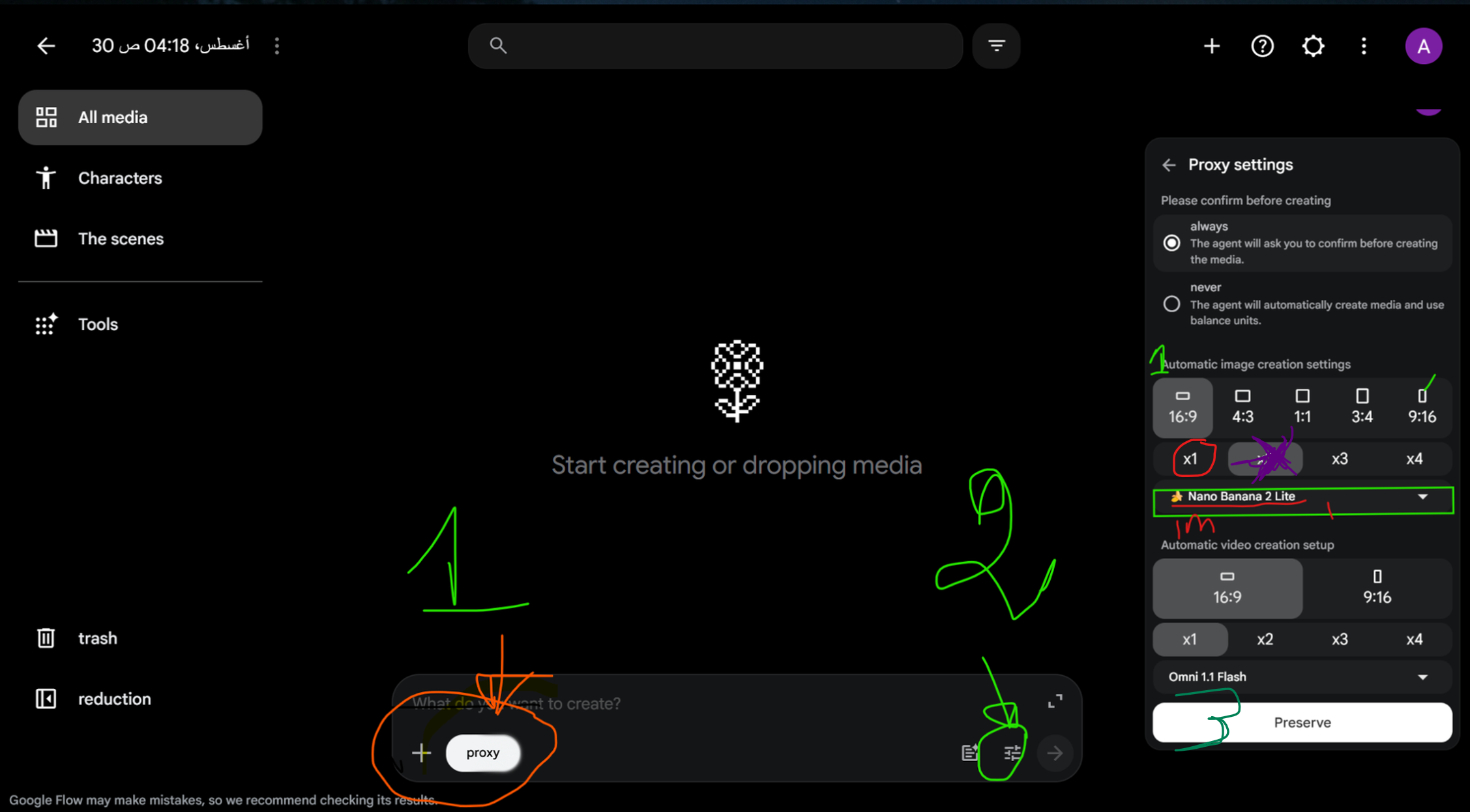
ضع هنا صورتك التي توضح الإعدادات وزر Agent بالتحديد.
أنتظر حتى تنتهي الدفعة كاملة. لا أبدأ الآن في تنزيل وترتيب الصور واحدة واحدة؛ أترك الدفعة تنتهي أولًا.
الخطوة 9 — أكرر الدفعات حتى ينتهي السكريبت
بعد انتهاء أول 20 صورة، أرجع إلى ChatGPT وأكتب له «Next». سيعطيني الدفعة الثانية من 20 برومبت.
ألصق الدفعة الثانية في Flow بدون تغيير طريقة العمل، أضغط إرسال وأنتظر. بعدها أرجع إلى ChatGPT، أطلب الدفعة التالية، ألصقها في Flow، وهكذا.
أستمر بهذه الطريقة حتى ينتهي السكريبت بالكامل، مهما كان عدد الدفعات التي يحتاجها الفيديو.
| الأداة | ماذا أفعل؟ | ماذا أحصل عليه؟ |
|---|---|---|
| ChatGPT | أكتب «Next» | 20 برومبت صور جديدة |
| Google Flow | ألصق الدفعة وأولد الصور | 20 صورة جديدة |
| التكرار | أكرر حتى يغطي السكريبت كاملًا | مجموعة الصور كاملة |
الخطوة 10 — أجعل Flow يرتب أسماء الصور ويجمعها
هذه من الخطوات التي توفر عليّ وقتًا كبيرًا. عندما يكون لدي عشرات الصور، يصبح تنزيلها واحدة واحدة ومحاولة معرفة أي صورة هي الأولى وأي صورة هي الثانية أمرًا متعبًا جدًا.
لذلك أطلب من Flow أن يعيد تسمية الصور بأرقام متسلسلة، تبدأ من الصورة 1 وتستمر حتى آخر صورة، ثم يجمعها كلها في ملف أو حزمة واحدة.
وهذه هي العبارة الإنجليزية التي أستخدمها:
I want you to rename the images so that each image is numbered in sequence, starting from image 1 through the final image. Then collect all of the images into one single file/package for me.
أنتظر حتى تظهر المجموعة كاملة، ثم أنزل الملف الواحد بدل تنزيل كل صورة على حدة. بعد ذلك أقوم بعمل Refresh للصفحة حتى تظهر أسماء الملفات الجديدة.
الآن أصبحت لدي سلسلة واضحة: 1، 2، 3، 4... إلى آخر صورة.
الخطوة 11 — أنقل كل شيء إلى CapCut
الآن أصبحت لدي العناصر الأساسية: ملف الصوت ومجموعة الصور كاملة. أفتح CapCut أو أي برنامج مونتاج أفضله، ثم أستورد الصوت ومجلد الصور.
لكن قبل سحب الصور إلى الـTimeline، أقوم بترتيب الملفات تلقائيًا من A إلى Z. وبما أن الصور أصبحت تحمل أرقامًا متسلسلة، سيعطيني الترتيب التسلسل الصحيح.
بهذه الطريقة أستطيع إدخال المجموعة كاملة إلى الـTimeline بدل ترتيب كل صورة يدويًا.
الخطوة 12 — أزامن الصور مع الصوت
هنا تأتي الخطوة التي تجعل الفيديو يبدو احترافيًا فعلًا. أستمع إلى التعليق الصوتي من البداية إلى النهاية وأتابع السكريبت أثناء وضع الصور في الـTimeline.
كل صورة تبقى على الشاشة في الجزء الذي صُممت من أجله. عندما تنتقل الجملة أو الفكرة إلى مشهد جديد، أنتقل إلى الصورة التالية المطابقة.
| الصوت | الصورة | الهدف في المونتاج |
|---|---|---|
| تبدأ الجملة | تظهر الصورة المطابقة | دعم الكلام بصريًا فورًا |
| تستمر الفكرة | تبقى الصورة مدة كافية | إيقاع مريح للمشاهدة |
| تبدأ فكرة جديدة | تظهر الصورة التالية | تطور طبيعي للقصة |
| لحظة اكتشاف مهمة | أقوى صورة مطابقة | رفع الانتباه |
وهذه من أهم الخطوات عندي. إذا كان الصوت يتحدث عن شيء والصورة تعرض شيئًا آخر، سيشعر المشاهد مباشرة بأن هناك انفصالًا. أما عندما تتبع الصورة الكلام، يصبح الفيديو أكثر سلاسة وتماسكًا.
الخطوة 13 — أضيف الحركة والمؤثرات بشكل بسيط
لا أريد أن أملأ الفيديو بالانتقالات والمؤثرات. أستخدم Zoom خفيفًا، حركة بسيطة، Cuts نظيفة وبعض المؤثرات الصوتية في الأماكن التي تخدم القصة فعلًا.
الهدف أن يبقى الفيديو حيًا دون أن تصبح المؤثرات أكثر وضوحًا من القصة نفسها.
الخطوة 14 — أنهي الفيديو بالـSEO والتغليف النهائي
بعد انتهاء المونتاج، أعود إلى الـAI Workflow للمرحلة الأخيرة: العناوين، الوصف، الهاشتاغات والـTags.
الـMaster Prompt مصمم ليعطيني عدة خيارات للعناوين، ووصفًا مناسبًا، وهاشتاغات وTags مرتبطة بالموضوع. بعدها أختار العنوان الذي يصنع أقوى فضول مع الحفاظ على الدقة وعدم التضليل.
أما الصورة المصغرة فأفضل أن تكون فكرتها واضحة جدًا: عنصر بصري واحد قوي، إحساس واضح بالخطر أو الفضول، ونص قليل جدًا عند الحاجة. يجب أن يفهم المشاهد وعد الفيديو تقريبًا من أول نظرة.
الـWorkflow كاملًا من البداية إلى النهاية
لماذا أرى أن هذه الطريقة قوية؟
بالنسبة لي، القوة الحقيقية ليست فقط أن الذكاء الاصطناعي يستطيع كتابة سكريبت أو إنشاء صورة. القوة هي أن عملية الإنتاج أصبحت قابلة للتكرار.
أستطيع إنشاء فيديو واحد، ثم أستخدم نفس النظام مع سؤال جديد وقصة جديدة. وهذا يحول طريقة العمل من مشروع منفرد إلى نظام محتوى كامل يمكنني تكراره باستمرار.
والأهم أن الصور يتم بناؤها انطلاقًا من السكريبت، وليس اختيارها بشكل عشوائي بعد انتهاء الصوت. وهذا يعطي ترابطًا أفضل بين الرواية والصورة ويجعل المشاهدة أكثر سلاسة.
قاعدة أخيرة: الأصالة والدقة
ادرس القنوات الناجحة، لكن لا تنسخ أعمالها. لا تنسخ السكريبت أو الجمل أو المشاهد أو الصور المصغرة أو الأصول الإبداعية. خذ الاستراتيجية العامة وابنِ نسختك الأصلية.
وبما أن هذا المجال مرتبط بالآثار وتطور الإنسان، انتبه جدًا للمعلومات. إذا كانت معلومة أو قراءة أثرية غير مؤكدة، وضّح ذلك. لا تخترع اكتشافات فقط لأنها تجعل القصة أكثر إثارة.
الآن يمكنك إنشاء أول فيديو
هذه هي الطريقة الكاملة التي أردت أن أشاركها معك: Master Prompt واحد → فكرة → سكريبت → صوت → دفعات صور متزامنة → ملفات مرتبة → مونتاج نظيف.
بعد أن تنتهي من الفيديو الأول، كرر نفس النظام مع الفكرة التالية. بهذه الطريقة يمكن لعملية واحدة أن تتحول إلى نظام كامل لبناء قناة يوتيوب حول هذا النوع من المحتوى.