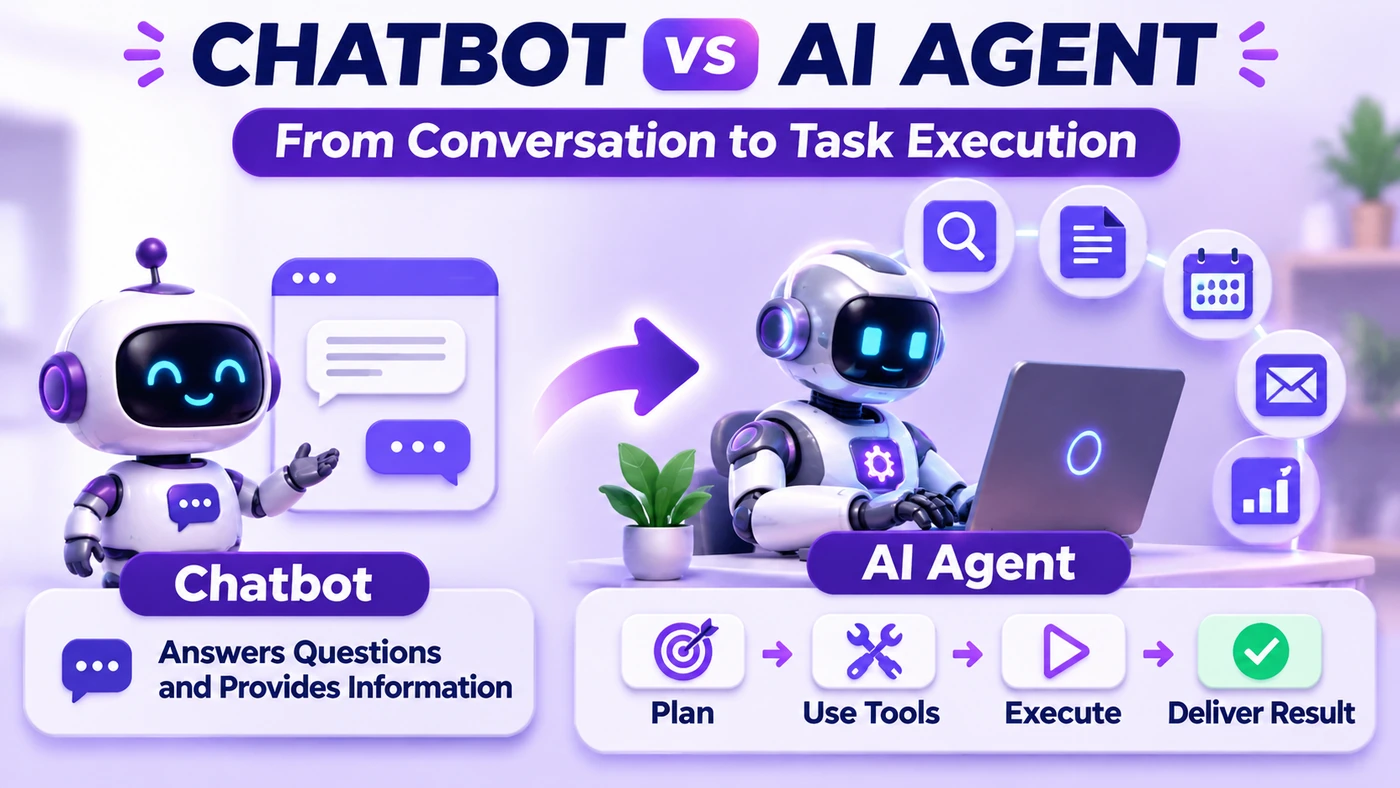
A chatbot can explain how to do a task. An AI agent may be able to carry it out using connected tools. That is the practical shift behind the move from conversational AI to agentic AI: instead of asking for one answer at a time, you describe an outcome and let a capable system plan the work, use approved tools, check results and return a deliverable.
But the distinction is more nuanced than “chatbots only talk and agents always act.” A chatbot is usually a conversational interface; an agent is a system design that can pursue a goal through decisions and tool use. An agent can still talk to you through a chat window, and a chatbot can sometimes call tools. What matters is how much of the task the system can plan and execute, and what permissions it has.
The short answer: conversation vs. goal-directed work
AI agent: works toward a defined goal, chooses steps, uses connected tools, observes what happens and adjusts its approach until it reaches a result or needs your input.
If you ask, “How do I prepare a competitor report?”, a basic chatbot may explain the process or draft a report template. If you ask an appropriately connected agent, “Research these three competitors, compare their public pricing, review the files I uploaded, create a spreadsheet and prepare a summary,” it may perform those steps—provided it has the necessary browser, file and document tools and the permissions to use them.
What is a chatbot?
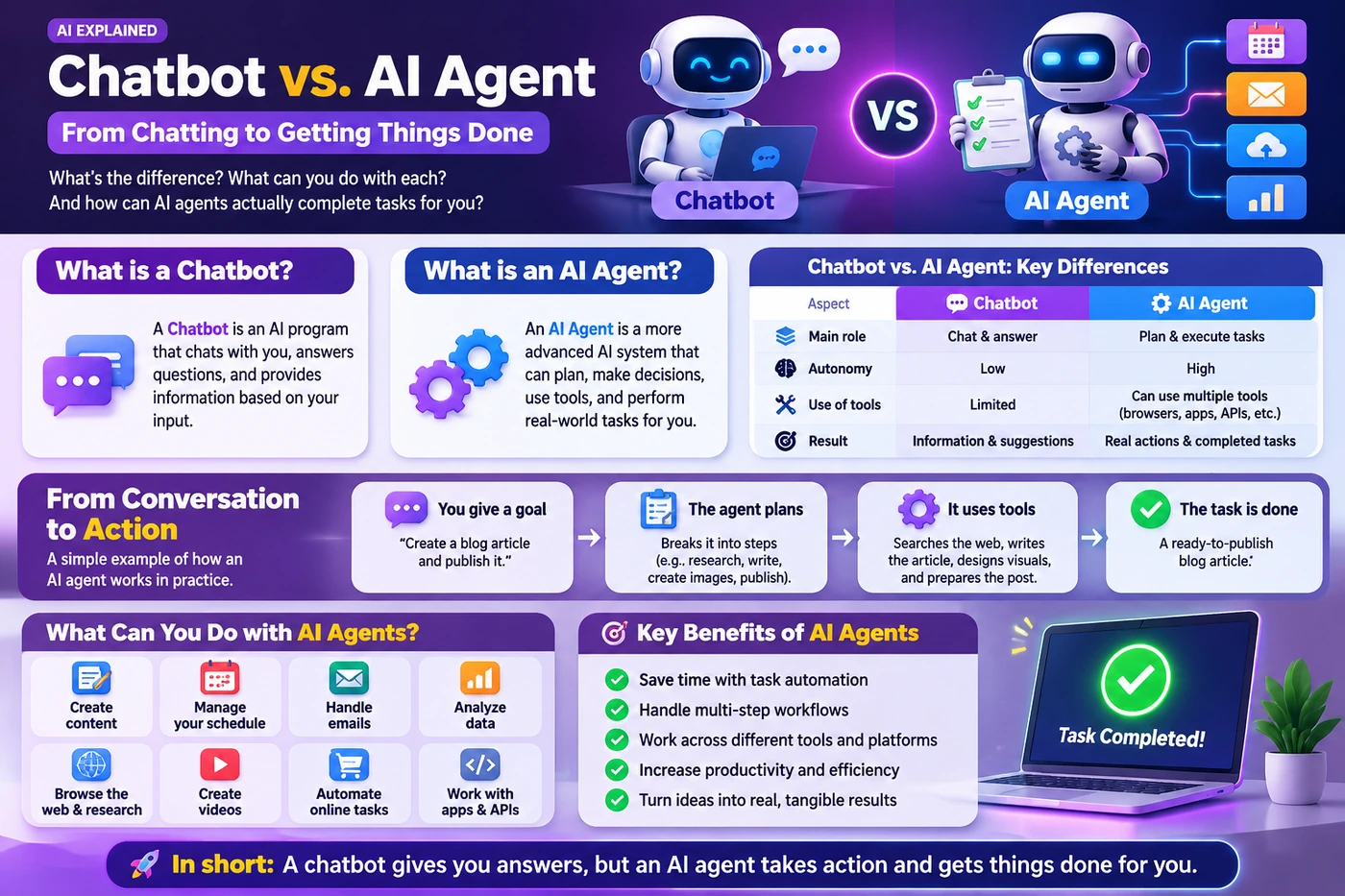
A chatbot is a software application that communicates with people through text or voice. It receives a message, interprets the request and generates a response. Modern AI chatbots use large language models to understand natural language, explain ideas, summarize information, translate text, draft content and help users think through problems.
Common chatbot tasks include:
- Answering questions and explaining difficult topics.
- Writing, rewriting, translating and summarizing text.
- Brainstorming ideas and suggesting plans.
- Explaining code or helping debug a problem.
- Responding to customer questions using a knowledge base.
- Helping a student practise a language or understand a lesson.
In a simple question-and-answer interaction, the user usually decides what to ask next and moves the work forward one message at a time. The chatbot may produce an excellent answer, but the user still performs the external steps: opening a website, downloading a file, updating a spreadsheet, sending an email or publishing the result.
What is an AI agent?
An AI agent is an AI-powered system designed to work toward a goal by interpreting instructions, deciding what to do next and using tools or connected systems to take action. A useful practical definition combines three ingredients: a model that reasons about the request, instructions and guardrails that define its boundaries, and tools that let it access information or perform operations.
OpenAI describes an agent as a system with instructions, guardrails and access to tools that can take action on a user's behalf. Its agent-building guide explains how tools retrieve information, execute tasks and connect to external systems.
An agent may be able to:
- Break a broad request into smaller steps.
- Choose whether it needs web search, files, a calculator, code or an app integration.
- Call tools and inspect the results they return.
- Continue, revise its plan or ask you a question when it encounters a problem.
- Create a useful deliverable, such as a report, spreadsheet, draft, organized files or updated record.
- Pause for approval before an action that affects the outside world.
This does not mean every agent is fully autonomous or can access every app. Its real abilities depend on the tools connected to it, the permissions granted, the quality of its instructions and the safety rules around its actions.
Chatbot vs AI agent: the key differences
The table describes the typical difference between a simple conversational chatbot and a goal-directed agent. Real products exist on a spectrum, so a tool-enabled chatbot may share some agent capabilities.
| Aspect | Chatbot | AI agent |
|---|---|---|
| Main purpose | Conversation, answers and content generation. | Completing a goal or multi-step task. |
| Typical flow | User asks → system responds → user decides the next step. | User sets a goal → agent plans → uses tools → checks results → delivers. |
| Planning | May suggest a plan for the user to follow. | Can select and adjust steps while carrying out the task. |
| Tool use | May have limited tools, retrieval or search. | Can choose among connected tools such as browsers, files, APIs and apps. |
| Execution | Often produces instructions, text or recommendations. | Can perform authorized operations and create deliverables. |
| Feedback | Usually waits for the next user message. | Can inspect tool results and continue or recover within its limits. |
| Autonomy | Often lower; the user directs each conversational step. | Can be higher, but remains bounded by permissions and approvals. |
| Best fit | Questions, explanations, brainstorming and drafting. | Research, coordination, repetitive processes and multi-step tasks. |
| Final result | An answer, idea, draft or recommendation. | Potentially a completed report, file, update, workflow or other action. |
There is no universal technical line that every vendor uses in exactly the same way. Anthropic distinguishes predefined workflows—where code directs the sequence—from more agentic systems, where the model dynamically directs its process and tool use. The practical lesson is to evaluate what a system actually does, not just the “agent” label. See Anthropic's guide to effective agents.
How does an AI agent work?
Although implementations vary, many agents follow a repeated cycle. They receive a goal, decide on a next step, call a tool, inspect the result and then decide whether to continue, change direction or ask for help.
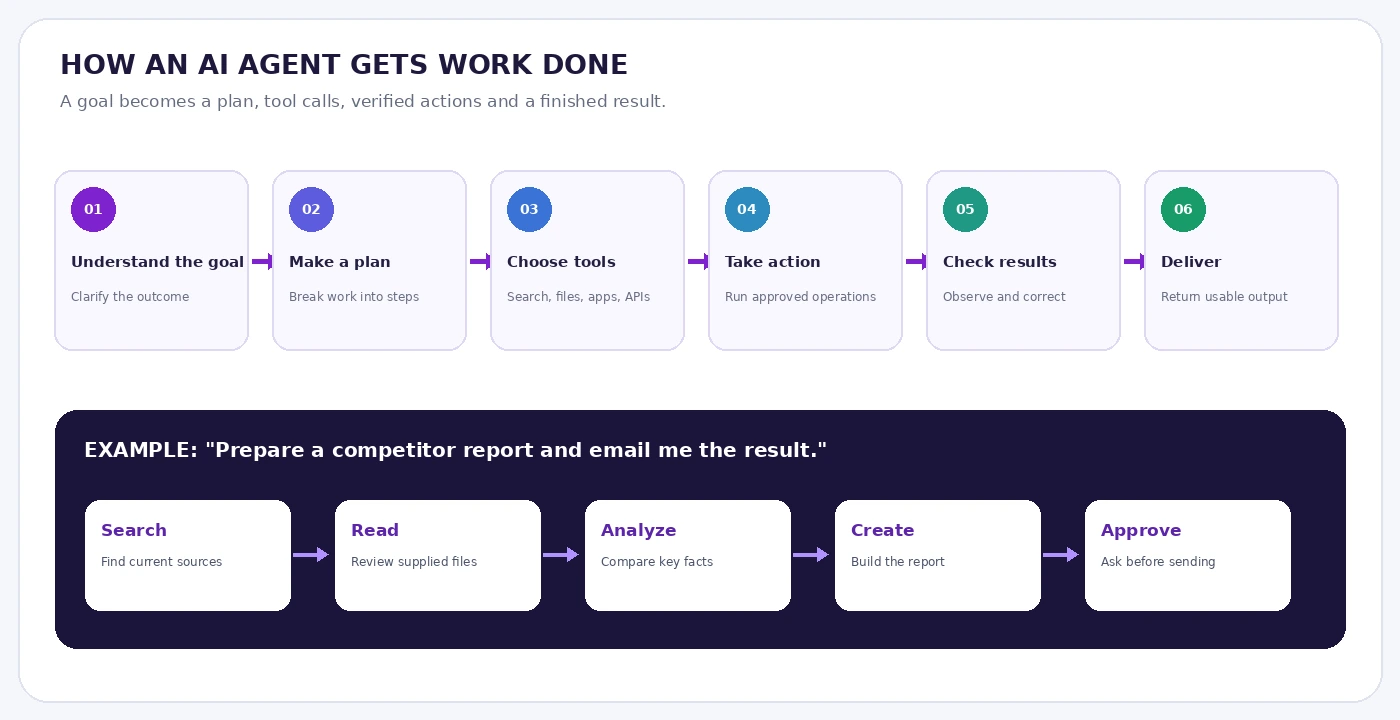
If a web search returns incomplete information, the agent may refine the query. If a spreadsheet cannot be read, it may ask for another format. If an action needs a permission it does not have, it should stop and request access or provide a safe alternative. A well-designed agent has clear stopping conditions rather than continuing indefinitely.
What can you do with an AI agent?
The most useful question is not “Which AI agent is the smartest?” but “Which repeated or multi-step task would I like to hand over?” Here are practical areas where an agent can help when the necessary tools and permissions are available.
1. Research and reports
Search multiple sources, collect facts, compare options, read supplied documents and prepare a structured report with links and a summary.
2. Email and communication
Summarize messages, identify action items, draft replies and prepare follow-ups. Sending should require your approval when appropriate.
3. Files and documents
Read PDFs, extract information, compare versions, organize material and create a finished document or spreadsheet.
4. Scheduling and planning
Check connected calendar information, propose meeting times, prepare agendas and create approved events or reminders.
5. Data analysis
Inspect a dataset, calculate metrics, identify patterns, create charts and explain what the numbers mean.
6. Content production
Research a topic, prepare a content calendar, draft scripts, generate visual briefs and organize publishing assets for review.
7. Software and coding
Inspect a codebase, trace a bug, edit files, run tests and prepare a change summary within the granted permissions.
8. Repetitive business tasks
Classify requests, update approved records, prepare customer responses and connect steps across business tools.
Business platforms such as Microsoft Copilot Studio connect agents to organizational data and systems. Workflow tools such as n8n combine AI steps with application integrations. These are examples of the wider ecosystem, not a promise that every agent includes every integration.
A practical example in ChatGPT is ChatGPT Work with its Cloud Browser: on supported websites, it can read pages, click buttons, enter information in forms and carry out multi-step browser tasks. It pauses when it needs your input, sign-in or confirmation, and availability depends on your plan, region and workspace permissions. See how the Cloud Browser works.
A real example: from a request to a completed task
Imagine that you run a small business and ask:
What a basic chatbot might do
- Explain how to research competitors.
- Suggest a comparison-table structure.
- Draft a report outline or a sample spreadsheet.
- Tell you which steps to perform next.
What a connected agent could do
- Clarify the market, location and comparison criteria.
- Search permitted public websites and collect source links.
- Read the files you explicitly provide.
- Normalize findings and identify missing or conflicting data.
- Create a comparison spreadsheet and concise report.
- Check that the report is consistent with its sources.
- Return the files and explain any gaps or assumptions.
If you then ask it to email the report to your team, it needs an authorized email connection. A safe setup drafts the message and pauses for your approval before sending it. The difference is not that the agent is always right; it is that it can connect several actions into one supervised task.
AI agent vs chatbot vs workflow automation
- Chatbot: a conversational interface for asking questions and receiving responses.
- Workflow automation: a predefined sequence of steps, often triggered by an event.
- AI agent: a goal-directed system that can choose tools and next steps based on instructions and observations.
- Agentic workflow: a combination of fixed process steps and AI-driven decisions.
- Multi-agent system: multiple specialized agents that divide work or hand tasks to one another.
Anthropic recommends starting with the simplest architecture that works. OpenAI's practical guide also discusses single-agent and multi-agent patterns and recommends keeping the system simple before adding more agents. Read the practical guide to building AI agents.
How to give an AI agent a task properly
A vague request such as “handle my business” is difficult to execute safely. A strong task description explains the outcome, context, available materials, allowed tools, boundaries and expected deliverable.
- Describe the result: say what should exist when the task is finished.
- Provide context: explain the audience, purpose, deadline and background.
- Identify resources: attach files or specify websites and accounts the agent may use.
- Set permissions: say what it may read, create, edit or send—and what requires approval.
- Define the output: specify whether you want a report, spreadsheet, draft or another deliverable.
- Set a completion test: explain how you will know the task is done.
A reusable task brief for an AI agent
Copy this template and replace the bracketed details.
You are my task-execution assistant.

GOAL
[Describe the outcome I want, not just the steps.]

CONTEXT
[Explain the background, audience, deadline and relevant details.]

AVAILABLE MATERIALS
[Name the files, links, accounts or data sources you may use.]

TOOLS AND PERMISSIONS
- You may use: [approved tools and connected apps].
- You may read: [approved files or sources].
- You may create: [allowed drafts, documents, sheets or records].
- Do not send, publish, purchase, delete, transfer money or change important settings without asking me first.

PLAN
1. Break the goal into clear steps.
2. Identify missing information before acting.
3. Use relevant tools and verify what each step returns.
4. If a tool fails, explain the issue and choose a safe alternative.
5. Pause for my approval before any sensitive or irreversible action.

DELIVERABLE
[Specify the final file, report, draft, updated record or result.]

DONE WHEN
[Define what a successful result must contain.]

Before finishing, summarize what you completed, what you could not complete, and any action that still needs my approval.
Safety, permissions and human approval
An agent that can take action needs stronger boundaries than a system that only generates text. Before connecting an agent to your accounts or business systems, decide exactly what it may access and which actions must stop for your approval.
Use the principle of least privilege
Give the agent only the access it needs. If it only needs to read a folder, do not give it permission to delete or share every file in your drive. If it only needs to draft an email, do not automatically authorize sending.
Require approval for consequential actions
Sending external messages, publishing public content, making purchases, changing account settings, deleting data or modifying important records should use an explicit review step. OpenAI documents human review that pauses a run until a person approves or rejects a sensitive tool call. Read about guardrails and human review.
Protect data and verify the result
- Do not connect sensitive accounts unless the task genuinely requires them.
- Check sources and calculations behind important reports.
- Review permissions and revoke access that is no longer needed.
- Test new agents with sample data or a sandbox before using production accounts.
- Keep a record of what the agent read, changed and completed.
- Treat instructions found inside webpages or files as untrusted content unless verified.
When should you use a chatbot—and when do you need an agent?
| Your task | Better starting point | Why |
|---|---|---|
| Explain a concept or answer a question | Chatbot | A direct answer is enough. |
| Brainstorm names or draft a paragraph | Chatbot | The task ends with generated content. |
| Research multiple sources and create a report | Agent | It involves several connected steps and tools. |
| Read files, compare data and create a spreadsheet | Agent | The system must access materials and produce a file. |
| Send an email or update a business record | Agent with approval | The task changes something outside the conversation. |
| Run the same fixed process every time | Workflow automation | A predictable sequence may be simpler. |
| Handle a complex process with changing decisions | Agentic workflow | Combine fixed steps with flexible decisions. |
The best choice is not always the most autonomous one. If a single answer solves the problem, a chatbot is faster and simpler. If the task requires repeated decisions, connected tools and a concrete deliverable, an agent may save time. If the steps are identical every time, ordinary automation may be more predictable.
Frequently asked questions
Is an AI agent just a more advanced chatbot?
Not exactly. A chatbot describes a conversational way to interact with AI. An agent describes a system that can pursue a goal by choosing steps and using connected tools. The two can overlap: an agent can be accessed through a chat interface.
Can a chatbot use tools too?
Yes. A chatbot may search the web, retrieve files or call a function. Tool access alone does not always make a system a fully agentic system. The key question is whether it can decide how to use tools across multiple steps, observe results and adjust its plan to complete a goal.
Can an AI agent send emails or book things for me?
Only when the relevant email, calendar, booking or other integration is available and authorized. For consequential actions—such as sending a message, making a purchase, changing records or deleting data—use an approval step and review the exact action before it runs.
Does an AI agent work without the internet?
Some agents can perform local tasks using connected files or software, but web research and cloud services require network access. The tools and data sources available to the agent determine what it can actually do.
Do I need to know how to code to use an AI agent?
No. Some products let people delegate tasks through natural language or build agents with low-code tools. Building custom agents, connecting APIs and controlling complex workflows may require technical skills.
Can AI agents make mistakes?
Yes. They can misunderstand goals, use an unsuitable tool, misread data or fail during an external action. Use narrow permissions, test workflows, verify important outputs and require human approval for sensitive or irreversible steps.
What is the difference between an AI agent and an automation workflow?
A traditional workflow usually follows a path defined in advance. An agent can choose among tools and adjust its next steps based on the task and the results it observes. Many useful systems combine both: fixed workflows for predictable steps and an agent for decisions that need flexibility.
Can several AI agents work together?
Yes. A multi-agent system can divide work among specialized agents—for example, research, analysis and writing—under a manager or through handoffs. But multiple agents add coordination and evaluation overhead, so a well-designed single agent is often a better starting point.
Sources and further reading
The definitions and safety guidance in this guide are informed by official documentation and technical research. Product capabilities change, so check current documentation before connecting an agent to important accounts.
- OpenAI — Building agents: concepts, tools and orchestration
- OpenAI — A practical guide to building AI agents
- Anthropic — Building effective agents
- OpenAI — Guardrails and human review
- Microsoft Learn — Copilot Studio overview
- n8n — Human review for AI agent tool calls
- OpenAI Help — Using cloud browser in ChatGPT Work
In short: a chatbot helps you think and communicate; an AI agent can help you get work done by connecting reasoning to tools and carefully controlled actions. The most useful agent is not the one with unlimited freedom—it is the one with the right tools, clear boundaries and a result you can verify.

ADAWATAI — practical AI workflows and creative resources for modern creators.